
Data Bridge for finance teams: How to import and reconcile any data in Cryptio
Data Bridge is Cryptio’s data pipeline for institutional finance teams.
It connects your internal systems (trading systems, ledgers, data warehouses, or file exports) to Cryptio so you can:
Ingest transactions and balances at scale
Reconcile them against on‑chain and exchange data in AutoRec
Decide what to import into your accounting workspace
All imported data remains traceable, with a clear audit trail from your internal system to Cryptio. This feature is only available for Enterprise plans. Please talk to your Account Manager or ESC team to learn more.
What Data Bridge Does
Creates a secure, immutable landing zone outside your workspace (nothing changes in your books until you choose to import).
Connects directly to your systems via S3, SFTP, BigQuery, or Google Sheets for automated ingestion.
Supports both transaction (movement) and balance datasets for reconciliation.
Runs incremental imports (deltas) after an initial backfill for large data volumes.
Provides import run history, validation errors, and raw file inspection so you can track data quality end to end.
Integrates with AutoRec for reconciliation or with Imports for accounting workflows.
Finance Team Responsibilities
Define the scope
Which entities, products, and wallets/exchanges should be covered
What you want to reconcile (e.g., internal trade system vs exchange vs on-chain)
What should be imported into the main Cryptio workspace vs kept for reconciliation only
Agree on data requirements You confirm the business requirements; your data/engineering team confirms feasibility.
The columns you need for reconciliation and accounting (e.g., date, asset, amount, Trade ID, internal transaction ID, valuations).
The matching keys you’ll use in AutoRec (e.g., transaction hash, Trade ID, internal IDs).
Whether you need transaction-level recs, balance-level recs, or both.
Review and sign off
Once Data Bridge is set up:
Use AutoRec to match internal data vs on-chain/exchanges.
Review Bridge Movements and AutoRec results for breaks.
Decide which rows should be imported into your main workspace for accounting and reporting.
Month‑end checklist
At each close, finance teams typically:
Confirm the last successful sync ran up to the desired date.
Run or review key AutoRec rules using Data Bridge datasets.
Investigate breaks; raise any data issues to your internal data/engineering team or Cryptio.
Import the final, agreed set of transactions into the main workspace.
Data/Engineering Responsibilities
Provide sample data & required fields
Share a representative extract and confirm the fields needed for your use case (date/time, asset, quantity/amounDatat, unique keys such as Trade ID/tx hash, plus a direction field or a way to derive it). We can map and transform—but we can’t invent missing fields.
Confirm file format
We support CSV, JSON Lines, and Parquet (CSV is most common).
Agree on delivery conventions (file discovery rules)
Define the folder/file pattern so the pipeline can find each drop—for example:
s3://<bucket>/<base_path>/<YYYY>/<MM>/<DD>/transfers.csv.After the initial backfill, send incremental deltas only (don’t resend full history).
Choose transport & share credentials
Set up S3 / SFTP / BigQuery / Google Sheets access and provide read credentials (region, bucket, base path, table, etc.). You can use a client‑hosted bucket or a Cryptio‑hosted one; IT usually provides these details. An S3 connection can be configured directly in the UI.
Asset & field mapping inputs - Cryptio technical support team to help here.
Asset Mapping: Map internal identifiers (e.g.,
usdc, internal codes) to Cryptio asset IDs; bulk upload is supported. Asset UIDs can be copied from the Back Office asset catalog.Field Mapping: Define how columns populate Cryptio fields. Lightweight logic is supported (e.g., infer direction from the sign of the amount). Initial mappings may require assistance from L2/engineering; a more user‑friendly editor is in progress.
Getting Started with Data Bridge
1. Prepare Your Source Data
Before connecting Data Bridge, make sure your dataset is complete and consistently structured.
Confirm all required fields exist in your internal systems.
Export data in one of the supported formats: CSV, JSON Lines, or Parquet.
Use consistent folder and file naming conventions, such as:
base_path/YYYY/MM/DD/transfers.csvEnsure files follow an incremental or daily delivery pattern.
2. Provide Data Access
Go to Apps → Data Bridge → Data Access to connect your storage location.
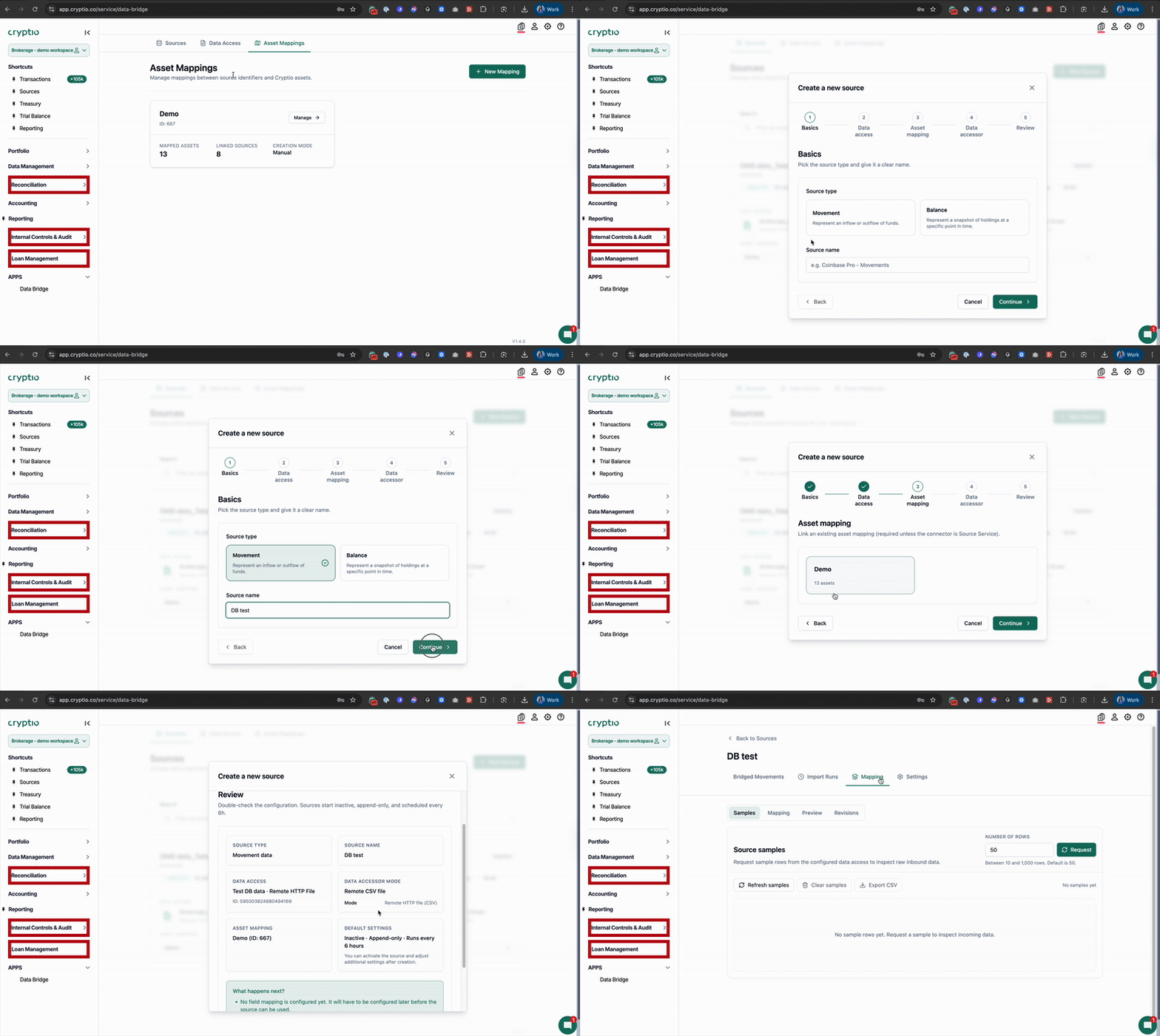
Supported connectors include:
Amazon S3
Google BigQuery
SFTP
Google Sheets
From there:
Enter your access credentials.
Provide folder paths and file structure.
Confirm how incremental loads (delta files) are delivered.
3. Configure Asset Mappings
If your data uses internal asset codes or custom naming:
Use Asset Mapping to match your internal identifiers with Cryptio’s standardized asset database.
This ensures correct valuation, pricing, and reconciliation downstream.
Cryptio team members will need to help you complete this process as we need to provide the Asset unique identifier in Cryptio.
4. Connect Your Sources
Once data access is verified:
Select the file or folder Cryptio should ingest.
Apply the correct mapping template to define how the source should be interpreted.
Save the source connection so it can be used for imports and reconciliation.
5. Configure Field Mapping
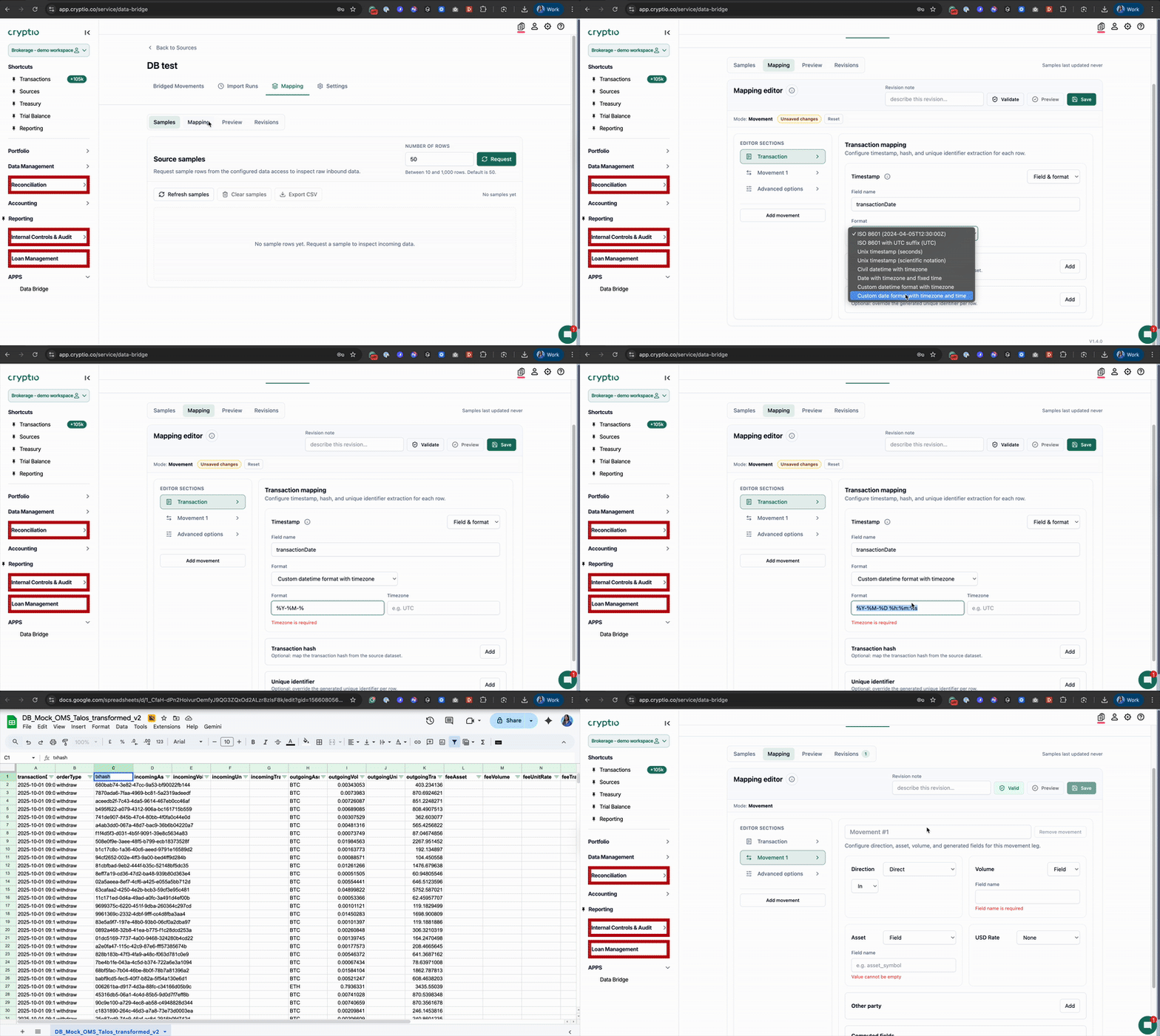
After the source is connected, map each external field to its Cryptio equivalent.
Work with the Cryptio team to map required fields such as dates, amounts, and asset identifiers.
Use Field Mapping to align column names and apply lightweight transformation logic when needed (e.g., deducing direction from positive/negative values).
Under Advanced options → Dictionary, import any additional fields as Custom Fields.
These can be used for:
Filtering
Labelling
Grouping
Advanced reporting
AutoRec matching rules
6. Validate and Monitor Your Data
Once mappings are complete:
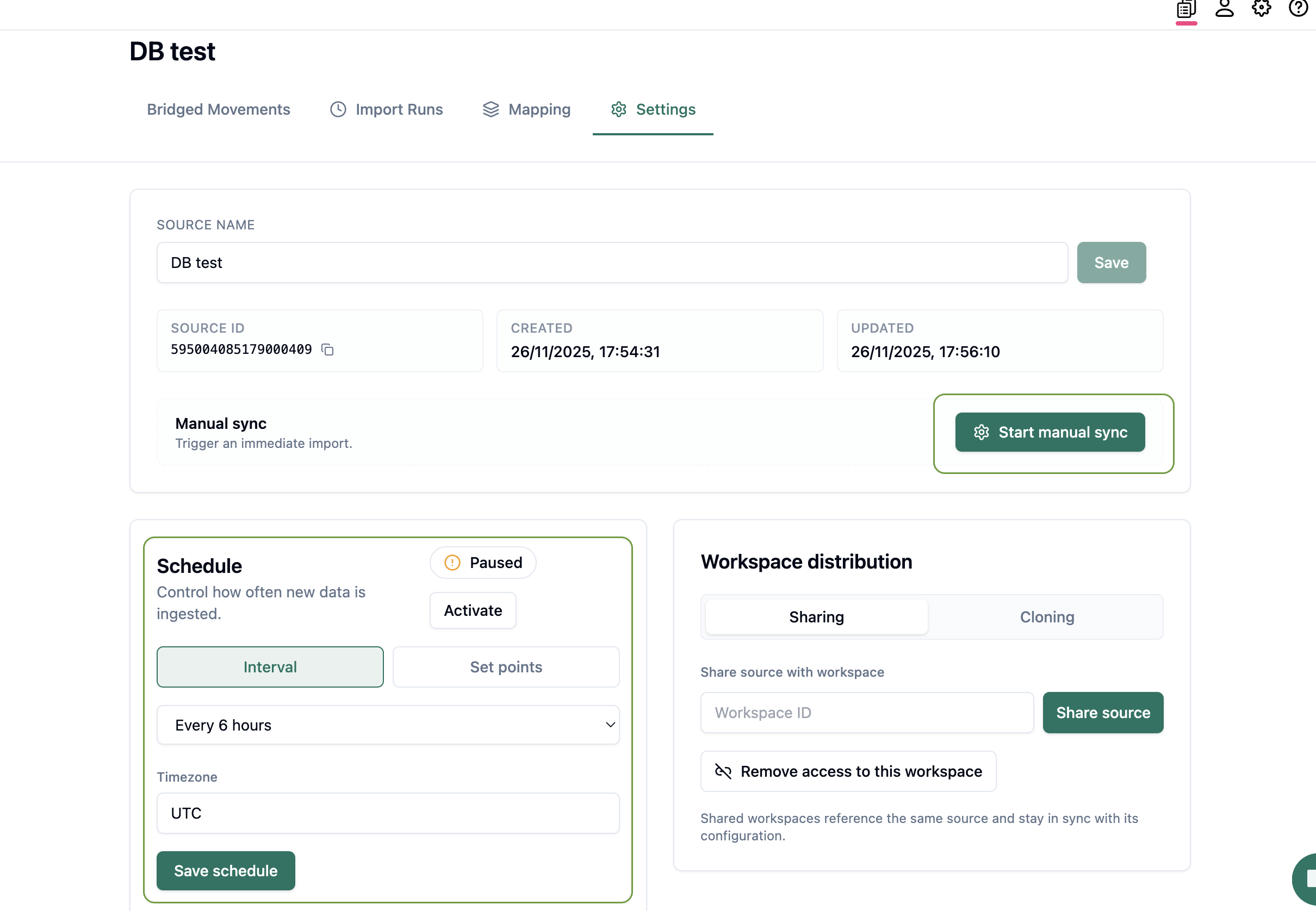
Run your first ingestion manually.
Confirm all transactions are processed correctly in the Control Pipeline.
Schedule regular automatic syncs once everything is validated. Configure daily or more frequent syncs.
Best practice: Pause/resume ingestion for audits or cutovers.
7. Debug Any Issues
If any errors occur during ingestion:
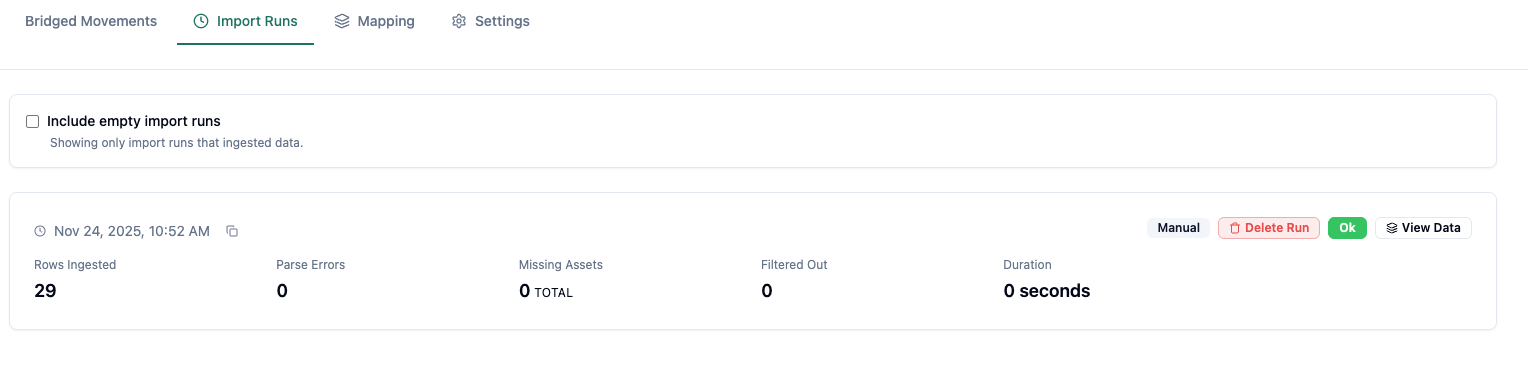
Review the Import Runs page.
Look for issues such as:
Missing asset mappings
Invalid dates
Parsing or formatting errors
Resolve issues and re-run ingestion.
Error resolution: Finance handles mapping issues; Data/Engineering fixes format or source data issues.

8. Activate the Data Source for Reconciliation and Accounting
When your pipeline is fully validated:
The Cryptio team will enable the Data Bridge source for use across the platform (AutoRec, Standard Import, reporting, and more).
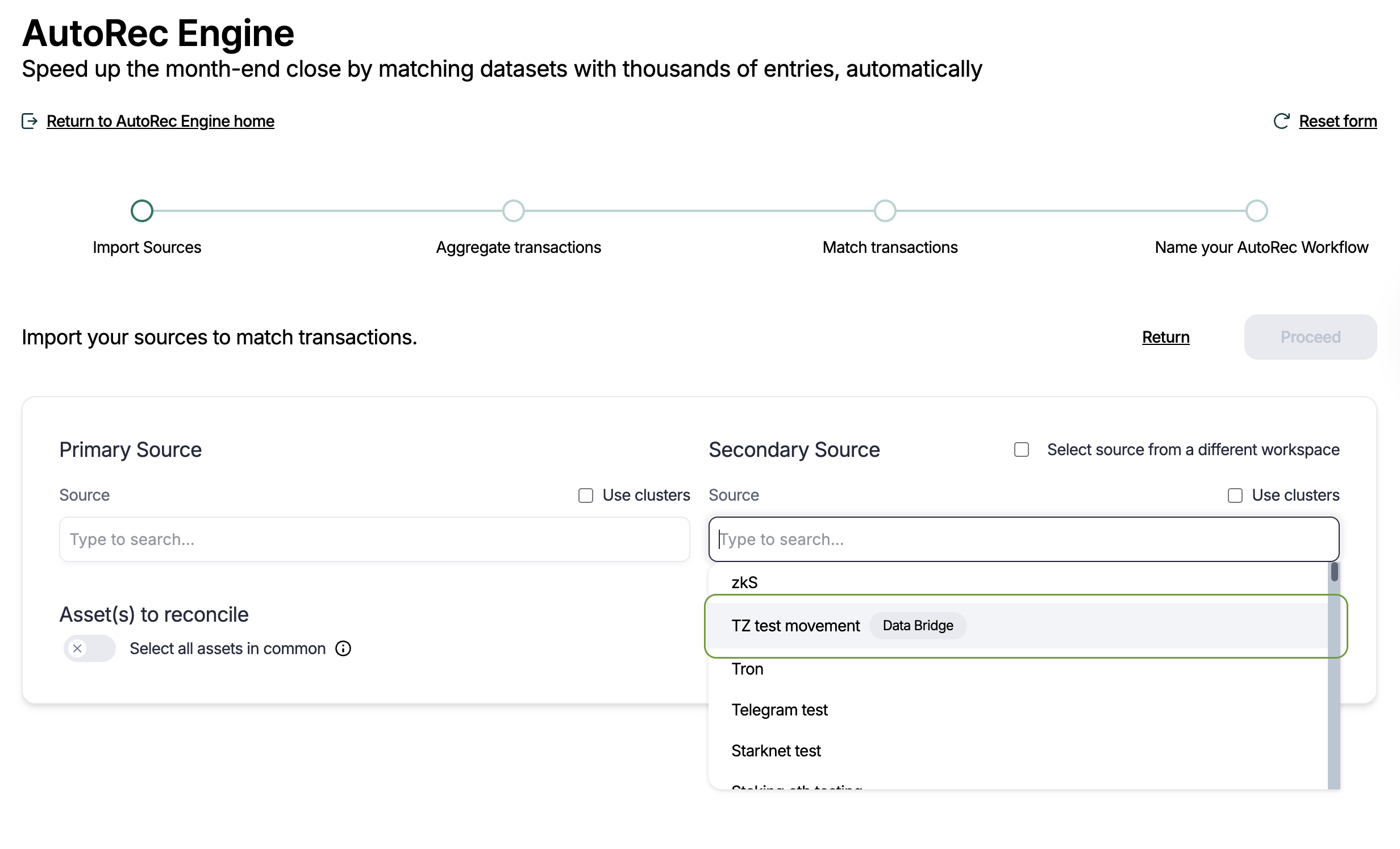
AutoRec reconciliation: Compare your internal dataset (via Data Bridge) with exchange or on‑chain data directly—no secondary workspace needed.
Workspace import (optional): Import selected rows into your main workspace for accounting and reporting; the original Data Bridge data remains immutable.
An automatic activation option will be available soon.
Notes & FAQs
Can customers export Data Bridge data?
Not yet. Full and filtered exports are planned.
What’s immutable?
All data in Data Bridge. Imported copies in your workspace are editable.
Can Data Bridge handle balances?
Yes. AutoRec can aggregate movements to match balance snapshots.
Does Data Bridge change data in my workspace automatically?
No. Data first lands in Data Bridge, outside your workspace, as immutable records. Only when you choose to import do rows become standard workspace movements you can edit, label, and post.
Can we reconcile on balances instead of every single transaction?
Yes. You can ingest balances into Data Bridge, and AutoRec can compare them to the sum of movements on-chain or on an exchange.
Do we still need a second “reconciliation workspace”?
No. A major benefit of Data Bridge is that you can reconcile your main workspace directly against a Data Bridge source, avoiding duplicate workspaces and duplicate data.
Who fixes errors shown in Data Bridge?
Asset mapping issues (new tokens, naming differences): often solved by Finance or Cryptio, using Asset Mapping.
Format or data quality issues (invalid dates, missing fields): typically handled by your Data/Engineering team, sometimes with Cryptio support.
How often should we send data?
Most clients send historical data once, then daily deltas. Some high-volume teams choose multiple runs per day. Finance should decide this based on how often reconciliations are needed.
Our internal asset names don’t match market tickers—does that matter?
That’s expected. Asset Mapping lets you align internal IDs/names with Cryptio’s catalog. Once mapped, reconciliations and reports use the standard Cryptio asset definitions.
Talk to Us
Data Bridge is available for enterprise customers.
To enable it or coordinate implementation across Finance, Data/Engineering, and Cryptio, contact your Implementation Manager or support@cryptio.co.